



























How to Buy an LMS: A Practical Guide for School Groups
A comprehensive toolkit to help leaders of a group of schools select the right Learning Management System. By the Toddle RFP Team.

Key takeaways
- 01
Get everyone on the same page before you start. Agree why you're changing, who makes the decisions, what should be consistent across schools, and where schools need flexibility.
- 02
Eliminate before you evaluate. Start with your non-negotiables to narrow the field. Then decide whether a public or private RFP makes more sense for your group.
- 03
Make it easy to compare vendors fairly. Give everyone the same requirements and pricing schedule, but leave room to show what's possible. Score depth, fit, and value for money.
- 04
Get to know the team behind the platform. Speak to school groups they've worked with, check their implementation experience, and agree on migration, training, support, and phased payments before signing.
- 05
Start small, scale with confidence. Test migration and integrations with a few schools, involve more schools in testing real workflows, and roll out in waves once everything checks out.
Why We Wrote This Guide
School technology is changing fast, and what is possible today is very different from what it was even a few years ago. Schools, always looking for ways to improve student learning, are actively evaluating what these changes mean for their teachers, their students and their technology. More and more schools and groups of schools are doing so, and for many, that starts with a fresh look at their LMS.
For most, that review runs through a Request for Proposal (RFP). The average school spends 6–10 weeks writing one. For a group of schools, the effort multiplies: more schools, more people, more committees and more sign-offs.
Choosing an LMS is one of the biggest technology decisions a group's leaders will make. It shapes how teachers plan and teach, how students learn and how families stay involved, in every school, every day. Yet many of the people asked to lead it are doing it for the first time, without a playbook and alongside their day jobs. So the process often takes longer than it should, and it is hard to know what a good one looks like: who to involve, what to ask for, and how to decide.
This guide is here to solve both. It will help you cut the time in half and show you what good looks like. Getting it right matters: the wrong LMS means disruption for teachers, students and families, and in a group, that disruption reaches every school.
We are seeing an increasing number of RFPs from groups of schools
We are seeing a lot of groups of schools evaluating their technology stack. In our conversations, there are 4 key reasons that come out for this evaluation:
Groups increasingly want to work as one system, not a set of separate schools
Excellence across a group depends on a coherent digital strategy, with every school pulling in the same direction. When each school runs its own platforms, codes and templates, that strategy is hard to hold together. Practice drifts apart from school to school, and good work in one school rarely reaches the others.
Leaders can’t see across the group
Data sits school by school. Attendance, learning and wellbeing trends only come together through manual reports. That makes it hard for the centre to spot problems early, or to support the schools that need it most.
AI is arriving school by school
Teachers are already using AI tools, often with little oversight of what data goes where. Groups want one AI rollout, with clear rules for governance, privacy and use, so the benefits reach every teacher. In our own experience at partner schools, teachers using Toddle’s AI tools report saving up to 10 hours a week.
Running many separate setups is costly and slow
Every school carries its own licences, integrations, support and training. The same work is done many times over, and when a student or teacher moves campus, their records do not move with them.
What has changed
None of these pressures is new. What is new is that groups can now do something about them. Until recently, most platforms were built for one school. Modern platforms can now run every school in a group on one instance, while each school keeps the local control it needs. And with AI built in, one platform can now do far more for teachers than it could even a few years ago.
This guide is written to help buyers at groups of schools design their LMS selection process.
The Benefits of a Group Solution
A group gets every benefit a single school gets: teacher time saved, fewer tools, and a platform ready for what comes next. On top of that, it gets:
The Buying Process
The rest of this guide walks through the four stages:
-
STAGE 1
Internal Alignment
Agree why you are changing, who decides, what is central and what is local, your budget, and how you will run the process.
-
STAGE 2
Building Your RFP Pack
Prepare what vendors receive: who you are, what you need, what you will check, and how you will score and compare them.
-
STAGE 3
Vendor Evaluation
See the platforms in action, go deep on each area, check what vendors have told you, and negotiate.
-
STAGE 4
Validate Before You Scale
Prove the platform with a small group of schools, then a wider one, before the whole group moves.
Stage 1: Internal Alignment
Before you ever send an email to a vendor, you must align internally. The most common cause of stalled RFPs is internal disagreement on what the group is actually trying to solve. In a group of schools, alignment has to happen at two levels: across the central office, and between the central office and its schools.
TEMPLATEInternal Project Charter Template, to record the decisions made in this stage in one place.1.1 Establish Your "Why"
Why are you looking for a new LMS now? The more specific your answer, the better. These are the reasons we see most often:
- Too many disconnected tools: We have too many disconnected tools and want to consolidate.
- Technology that has fallen behind: Our current platform hasn't kept up, and we need a partner that will carry us through the next wave of change.
- Pressure on teacher time: Our teachers are stretched, and we need tools, including AI, that give them time back.
- No structured way to roll out AI: We want AI to make a real difference to teaching and learning. That needs one platform across which AI can be rolled out properly, which a scattered set of tools cannot offer.
- Inconsistent practice across schools: Each school runs its own setup, with its own codes, templates and settings, and the group cannot see or guide practice across schools.
- No group-level view: Data sits school by school, so the centre cannot see attendance, learning or wellbeing trends across the group.
- Support that isn't good enough: The help we get from our current vendor, day to day and through implementation and change, falls short.
- Not a "True" LMS: We've been surviving on Google Classroom/Teams but need robust reporting and curriculum mapping.
Your list may include others. What matters is that your reasons are specific, written down and shared across the central office and schools. They become the yardstick for every decision that follows, from the requirements you set to the vendor you choose.
1.2 Governance and Stakeholder Mapping
Map out who needs to be involved. In a group, many people have a stake: school leaders, finance, compliance, an executive committee, and subject experts for each area. Clear governance keeps that manageable. It also helps to be clear about roles: IT, privacy and finance help rule options out, while teaching and learning leaders help choose among the rest.
TEMPLATELMS Stakeholder Mapping Worksheet, with a stakeholder register and decision rights for each step.1.3 Group versus School Control
Agree early which settings, content and data are set centrally and where schools can choose. These are the areas groups most often make consistent:
1.4 Budget Definition
Determine if you have a fixed budget cap or a "value for money" approach. We recommend the latter. For a group, also decide the commercial model early: whether licensing is held centrally, allocated to schools, or both, and how new schools join over time.
1.5 Know the Market, Then Decide: Public or Private RFP
There are many LMSs on the market, and trying to evaluate all of them quickly becomes confusing. Rather than trying to understand every platform, start by eliminating. In many of the RFPs we have seen, buyers begin with a short list of non-negotiables and rule out any platform that does not meet them. What counts as non-negotiable depends on who you are. The list below shows the ones we see most often.
If you are any school
8 NON-NEGOTIABLES- One platform for planning, assessment, portfolios, reporting and family communication, not separate products joined together
- Covers every year level you teach
- Your curricula and standards loaded by the vendor, with room to add your own
- Automated sync with your student information system, and sign-in with your Google or Microsoft accounts
- Native apps for teachers, students and families
- Data hosted where you need it, independent security certification (ISO 27001 or SOC 2), and student data never used to train AI
- AI built in, with controls you set
- References from schools like yours that have been live for at least 12 months
If you are a group of schools
6 NON-NEGOTIABLES- One instance for every school, not a separate copy per school
- Central configuration and templates, with room for local flexibility
- Roles and permissions defined once at group level
- Student records that move with students between schools
- Group-level analytics across every school
- References from groups of a similar size and complexity
If you are a large or multi-campus school
4 NON-NEGOTIABLES- Every campus, section and programme run in one environment
- School-wide templates, codes and settings, with campus-level administration
- Records that carry from early years to senior secondary
- Reporting and analytics by campus and for the whole school
If you are an American curriculum school
8 NON-NEGOTIABLES- Standards-based grading at district level: one library of standards, one mastery scale and one calculation method across all schools
- A choice of mastery calculation (most recent, highest, average or decaying average), alongside traditional grades where needed
- State standards, Common Core and NGSS ready to use
- Standards-based report cards, plus GPA, credits and transcripts, with weighting for honors, AP and dual enrollment
- Rostering and grade passback with your SIS (PowerSchool, Infinite Campus, Skyward), through OneRoster or Clever/ClassLink
- FERPA and COPPA compliance, plus signed state student data privacy agreements
- State and benchmark test data (for example NWEA MAP) alongside classroom results
- A VPAT showing WCAG 2.1 AA and Section 508 conformance
If you are an IB school
8 NON-NEGOTIABLES- Planners built for each programme: PYP (programme of inquiry, units of inquiry, exhibition), MYP (unit planner, global contexts, criteria A–D) and DP (subject guides, internal assessments)
- DP core tracked in one place: CAS (experiences, reflections, learning outcomes, supervisor sign-off), the Extended Essay (supervision, reflection sessions, deadlines) and TOK
- MYP Personal and Community Projects tracked, with supervisors, process journals and criteria
- ATL skills and learner profile attributes tracked across units, with coverage reports
- IB assessment built in: MYP criteria and 1–7 boundaries, DP 1–7 and predicted grades, and internal assessment workflows
- Integration with IBIS for exam registrations and grade submission
- Licensed by the IB, for both IB curriculum content and IBIS integration
- Evidence for authorisation and evaluation visits exported straight from planning
If you are a British international school
5 NON-NEGOTIABLES- Key Stage structures from EYFS to KS5
- Assessment tracking against targets: working-at, predicted and target grades on GCSE/IGCSE 9–1 and A Level scales, including Cambridge International
- Integration with your SIS, for example iSAMS
- Homework setting and behaviour points
- An evidence-collection workflow for British Schools Overseas (BSO) inspections and COBIS accreditation, drawing on planning, assessment and pastoral records
If you are an Australian school
9 NON-NEGOTIABLES- Australian Curriculum v9.0 loaded, plus state versions (Victorian Curriculum 2.0, NESA syllabuses in NSW, SCSA in WA), including general capabilities and cross-curriculum priorities
- Senior secondary certificates supported: SACE, VCE, HSC, QCE and WACE subject structures, assessment and results
- Reports that meet the Australian Education Regulation: at least twice a year, A–E (or equivalent) grades, and comparison with the student's peer group
- NCCD adjustments recorded with their level and supporting evidence
- NAPLAN results imported alongside classroom assessment
- A completed ST4S assessment
- Data hosted in Australia, with compliance with the Privacy Act 1988 and the Australian Privacy Principles
- Integration with Australian school systems such as Synergetic, TASS, Compass, Sentral or Veracross
- Pastoral and wellbeing records that support the National Principles for Child Safe Organisations
A market scan against these usually leaves only a few options. At that point, many groups run a private RFP with the vendors that remain rather than a public one. It takes complexity out of the process and makes it faster, because your effort goes only to vendors that can meet your needs.
Run a public RFP when you genuinely want to see which vendors are active and what is now possible. If the field is very unclear, a short request for information (RFI) can come first. Expect more submissions to read, more demonstrations to attend and a longer timeline.
Run a private RFP when the evaluation has, in effect, already happened. You have seen the platforms, met the teams and spoken to schools like yours, so you already know which vendors fit. Inviting only those one or two keeps the process focused and fast.
Common concerns about private RFPs. Two come up most often, and both are easy to address:
- Negotiating power. You keep your leverage. Your alternative is always to stay with your current systems, and a vendor that cannot show clear value against that does not win. You also don't need to tell vendors how many others are in the running; it is enough to say you are working with a select set of vendors.
- Fairness and transparency. A private process is sound when the decision is documented. Record how the field was narrowed (demonstrations, reference calls, school visits), compare pricing with similar schools or groups, and follow your procurement policy, including any value above which an open tender is required.
Stage 2: Building Your RFP Pack
Your RFP is not one document but a pack, usually in six parts: a context document that tells vendors who you are, the functional requirements, a diligence checklist on the vendor itself, the criteria you will score against, a pricing schedule, and instructions for responding. Together they give every vendor the same picture and the same questions, so their responses are easy to compare.
2.1 Context Document
The first part of the pack is a context document. It tells vendors who you are, so they can respond to your situation rather than to a generic school. Much of it comes straight from Stage 1. It describes your situation; the requirements and diligence checklist then ask vendors to respond to it.
2.2 Functional Requirements
This is the core of the pack. A short checklist can't do it justice, so we have built a full requirements template from the many RFPs we have taken part in. It comes in three versions:
- For groups of schools, including group-level governance, consistent practice and analytics
- For large single schools, including multi-campus and multi-programme needs
- For smaller schools, focused on the essentials
Each covers the full scope of a modern LMS: curriculum planning, assessment, portfolios, reporting, attendance, pastoral care, family communication, AI, integrations, and privacy and security. Start with the version closest to your context and adapt it to your "Why". Each template includes a short non-negotiables checklist, a rubric and a fit-score sheet for scoring, with the detailed requirements kept as a reference (see 2.4).
2.3 Vendor Diligence Checklist
Features are only half the decision. The other half is whether the vendor can deliver, and keep delivering. Include a diligence checklist for vendors to complete, covering financial stability, company background and ownership, security certifications, service levels, uptime history, incident response, data residency and contract terms. You will test the answers that matter most in Stage 3.
CHECKLISTLMS Vendor Diligence Checklist2.4 Evaluation Criteria and Scoring
Agree how you will score vendors before responses arrive, so every vendor is judged the same way. Weight the scorecard to reflect your "Why" and your critical success factors. A starting point for a group:
Adjust the weights to your priorities. The weights tell you what matters; the scoring method tells you how to measure it.
Most RFPs score everything as a yes/no checklist. That treats a feature built in real depth the same as one that only just ticks the box, and gives no credit for strengths you didn't ask about. There are three methods, and each suits a different kind of question:
- Checklist. Each item is answered yes or no. Use it only for non-negotiables, such as security, privacy, data hosting, sign-in and contract terms, where a "no" rules the vendor out. It is a gate, so it carries no points.
- Rubric. For each area, describe what basic, good and great look like, then place each vendor on that scale. Use it where platforms differ in maturity and you can describe great in advance.
- Fit score. Each panellist scores each area from 1 to 10 for how well it fits your context, with a one-line reason. Use it to reward depth and quality, including strengths you didn't think to ask about. Panellists score on their own first, discuss any gap of three points or more, then record an agreed score and the reason.
The best RFPs we have been part of use a mix: the checklist as the gate, then rubrics or fit scores area by area, then value for money. Each functional requirements template (2.2) includes all three, ready to adapt, with the detailed requirements kept as a reference.
TEMPLATELMS Platform Comparison Sheet, with weights, the non-negotiables and a value-for-money view.2.5 Pricing and Inclusions Schedule
Ask every vendor to price on the same basis, using one schedule you provide, and to show what each price includes. Alongside the licence (and its unit: per student, per user or per school), implementation, migration, integrations, training and support, vendors should mark which modules, AI features, services and support levels are included, which cost extra, and which aren't offered. Two quotes that look alike on price can include very different things. Seeing that side by side is what lets you judge value for money.
TEMPLATELMS Pricing and Inclusions Schedule, with price lines by year and an inclusions matrix.2.6 Response Instructions
Close the pack with clear instructions: the response format and any page limits, the deadline, how to raise questions and how answers will be shared with every vendor, demonstration dates, and a single point of contact.
TEMPLATEVendor Communication Email Templates, from RFP invitations and Q&A responses to shortlist and decline emails.Stage 3: Vendor Evaluation
3.1 Issue the RFP and Manage Questions
Send the RFP pack to the vendors you have chosen, from your dedicated RFP email address. Set a window for questions, and share every answer with all vendors so no one has an advantage. When responses arrive, check them first against your non-negotiables and the requirements template, then invite the vendors that qualify to demonstrate.
3.2 Initial Demonstrations
Treat the demonstration as a discovery session, not an exam. Share your context and the problems you most want to solve, and let each vendor show how its platform would solve them. If you restrict vendors to narrow questions and fixed answers, you will only see what you asked for, and miss what is possible. Leave time at the end for unscripted questions from your panel.
For a group, ask to see the platform from both ends: a teacher's day in one school, and a group leader's view across many schools.
TEMPLATELMS Demo Evaluation Rubric, covering initial demonstrations and deep dives by area.3.3 Deep Dives by Area
If you narrowed the field through elimination, you may already be down to two or three vendors. If not, use the first demonstrations to get there. Then run focused sessions with each, one per area, to test how well the platform fits your real needs:
- The IT session: security, SSO, rostering, integrations and data migration.
- The teaching-learning session: unit planning, standards, assessment, reporting and centrally governed subjects.
- The academic operations session: attendance and pastoral care, codes, workflows and permissions.
- The group session: central configuration, roles & permissions, group-level analytics.
- The implementation session: how the vendor would implement for you, what the support structure looks like after go-live, how it would approach change management, and an initial project plan with phases and milestones.
They belong in negotiation, once you have a preferred vendor.
3.4 Diligence and Reference Checks
With two or three vendors left, check what they have told you against the diligence checklist. Five areas on that checklist are the most important. Give them most of your attention:
Company and capacity
WHAT TO ASK FOR
Years in K-12, engineering team size, the number of groups of schools served, financial stability, and how involved senior leaders and founders will be in your project
WHAT GOOD LOOKS LIKE
A stable company with the engineering capacity to keep building for your needs, and senior leaders who stay involved well beyond the sale
Implementation
WHAT TO ASK FOR
A named implementation team, a plan for a comparable rollout, and what the vendor needs from you
WHAT GOOD LOOKS LIKE
The vendor has run implementations at similar scale, and the people who did that work will run yours
Migration
WHAT TO ASK FOR
What history can move, how it is checked, and where data is held during migration
WHAT GOOD LOOKS LIKE
The vendor does the migration work, reconciles the data with you before cutover, and keeps it in-region throughout
Support
WHAT TO ASK FOR
Who schools and the central team contact, response and resolution times, account management, and how support works after go-live
WHAT GOOD LOOKS LIKE
Support for every school, not only the central team, from people who know your setup, for the life of the relationship
Relevant experience
WHAT TO ASK FOR
References from schools or groups like yours that have been live for at least 12 months
WHAT GOOD LOOKS LIKE
References you can speak to freely, including the people who ran the implementation, at a similar scale and in a similar context
3.5 Select a Preferred Vendor
Once the deep dives, diligence and reference checks are done, choose a preferred vendor and tell them. Well-run RFPs almost always include this step. It moves you from comparing vendors to working with one, and leads straight into negotiation. By now, the open questions are usually the implementation plan and pricing.
3.6 Negotiations
Agree the implementation plan first, then the commercial terms. Following are the levers you can use to negotiate:
- Ramp-up contracts: A large group rarely moves every school and every module at once. Agree how the rollout will be phased, and phase the charges to match, rather than paying for the full contract from day one.
- Payment terms: Tie payments to schools and modules coming on board, rather than paying everything up front.
- Implementation fees: Treat these as one of the key levers for the project's success, not a line to cut. They are a one-time cost, and they fund the training, change management, extra support during the first rollout and ongoing support that make the project work.
- Contract in stages: Consider contracting the validation phase (proof of concept and user acceptance testing) first, with clear breakpoints before the full rollout.
Stage 4: Validate Before You Scale
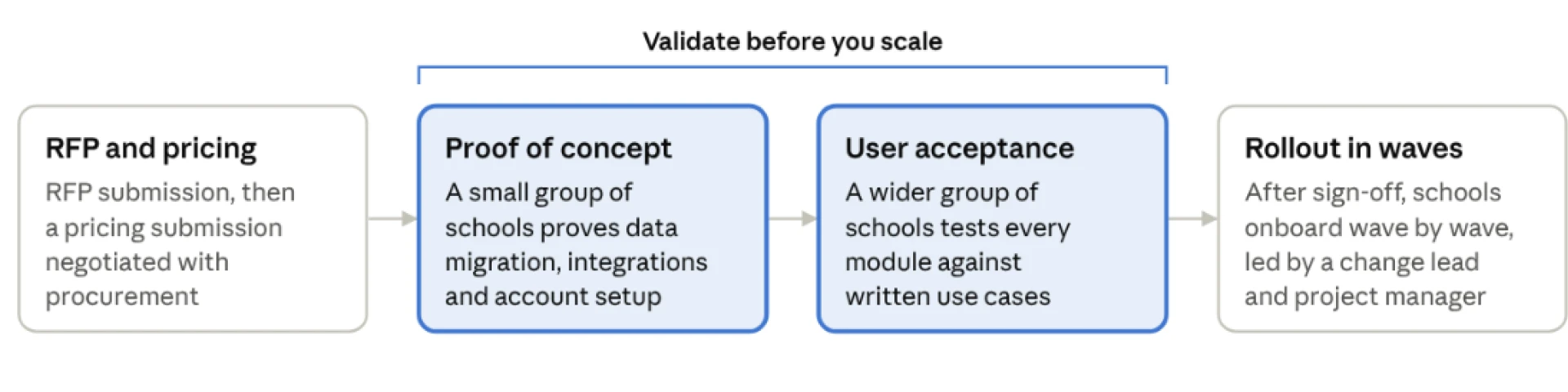
By this stage, the central team has evaluated the options, understood the context across schools and set the direction. Validation brings schools into that direction in a structured way. A few schools prove the foundations. A wider group tests the platform against real use cases. Their feedback shapes the rollout, and the people involved become part of the change, so the strategy belongs to the schools as well as the centre. Done well, this is not a delay. It is the first stage of your rollout.
4.1 Proof of Concept: Prove the Foundations
Start with a small number of schools and validate the basics: data migration from your current platforms, integrations with your SIS and identity systems, and account setup for your group. These are the foundations every later school depends on, so prove them first.
4.2 User Acceptance Testing: Prove It Works for Every School
Once the foundations hold, widen the group. Bring teachers and leaders from a representative set of schools into user acceptance testing, test every module against detailed use cases written with your subject experts, and capture their feedback. This confirms the platform works for schools, not only for the central team, and the people who take part become your champions when the rollout reaches their colleagues.
4.3 Resource the Change
A group-wide rollout needs owners on your side as well as the vendor's. Appoint a change management lead and a project manager before validation begins, and keep them through rollout. On the vendor's side, expect product and engineering teams to be involved alongside the implementation team, especially for data migration and any features specific to your group.
4.4 Sign Off and Roll Out in Waves
Agree the sign-off criteria before validation begins: data migrated accurately, integrations working, key use cases passing, and the first schools ready to go. Once user acceptance testing is signed off, roll out in waves, grouping schools by type, readiness or region, with training and extra support for each wave. Each wave makes the next one easier.
4.5 Keep It Proportionate
Every stage has a clear purpose and a clear sign-off, and a good partner will help you shape each one to your context: how many schools take part, which modules come first, and how your schools are grouped into waves. The aim is confidence, not complexity.
Conclusion & Next Steps
For a group of schools, choosing an LMS is more than a technology purchase. It decides how the group will teach, lead and work together for years. This guide is designed to help you make that decision with confidence. Agree your "Why" and what is central and what is local. Build an RFP pack that gives every vendor the same picture. Judge each platform on fit, delivery and value for money. Then test it with your own schools before everyone moves.
Above all, you are choosing a partner, not just a platform. The right one will help you shape the process, bring experience from groups like yours, and stay with you as long as you work together.
If you are starting this journey, we are always happy to share what we have learned from the groups that have gone before you.